How to Create an AI Study Planner (Step-by-Step Guide)
Let’s be real — juggling classes, assignments, deadlines, and life is tough. Most students either over-plan and burn out, or under-plan and fall behind. That’s where an AI study planner comes in.
An AI study planner uses artificial intelligence to help you organize your study schedule, track your progress, and make better decisions about how and when to study. It’s like having a personal coach who never sleeps and always knows your upcoming deadlines.
In this guide, you’ll learn exactly how to create your own AI study planner — whether you’re using an existing tool or building something custom. Let’s get into it.
What Is an AI Study Planner?
An AI study planner is a digital tool that uses AI to help students manage their time, plan study sessions, and stay on top of their academic goals. Unlike a basic calendar or to-do list, an AI planner adapts to your schedule, learns from your habits, and gives personalized recommendations.
Think of it this way: a regular planner tells you what you wrote down. An AI planner tells you what you should be doing based on your goals, deadlines, and available time.
Most AI study planners can:
- Break big study goals into smaller, manageable tasks
- Schedule study sessions around your free time
- Remind you about upcoming tests or assignment deadlines
- Suggest topics to review based on weak areas
- Adjust your plan automatically if you miss a session
Why Should You Use an AI Study Planner?
Great question. Here’s what makes an AI study planner genuinely useful compared to traditional methods:
1. It Saves You Time
Manually planning study sessions takes effort. You have to think about what to study, how long it’ll take, and when you’re free. An AI planner does all of that in seconds.
2. It Keeps You Consistent
One of the hardest parts of studying is showing up consistently. AI planners send reminders and keep you accountable, so you don’t forget to review your chemistry notes for the third week in a row.
3. It Adapts to You
Life happens. If you skip a session or a new assignment pops up, an AI planner reshuffles your schedule automatically. It doesn’t judge you — it just adjusts.
4. It Reduces Stress
When you have a clear, organized plan staring back at you, that overwhelming feeling tends to shrink. Knowing exactly what to study and when takes a huge weight off your shoulders.
How to Create an AI Study Planner: Step-by-Step
You don’t need to be a tech genius to set this up. Here are the two main approaches — using a ready-made AI tool, or building your own with a little help from AI chatbots.
Step 1: Define Your Study Goals
Before any AI can help you, you need to know what you’re working toward. Ask yourself:
- What subjects or topics do I need to study?
- What are my upcoming deadlines, exams, or assignments?
- How many hours per day can I realistically study?
- What are my strongest and weakest subjects?
Write this down clearly. The more specific you are, the better your AI planner will work. For example: “I have a history exam in 3 weeks, I can study 1.5 hours on weekdays, and I struggle with dates and timelines.”
Step 2: Choose Your AI Tool or Platform
There are several ways to build or use an AI study planner. Here are the most popular options:
Option A: Use a Dedicated AI Study Planner App
Apps like Motion, Notion AI, MyStudyLife, or Goblin.tools are built with AI features that can auto-schedule your study sessions. You enter your subjects and deadlines, and they build a plan for you.
Option B: Use ChatGPT or Claude to Build a Custom Planner
If you prefer something more flexible, you can use an AI chatbot like ChatGPT or Claude to create a personalized study plan. Just give it your details and ask it to build a weekly schedule. For example:
“I have 3 exams in 2 weeks — math, biology, and English. I can study 2 hours every weekday and 4 hours on weekends. Can you build me a study plan?”
The AI will generate a structured schedule you can follow or paste into a document. You can try this right now for free — just head over to ChatGPT or Claude and paste in your schedule details.
Option C: Use Google Sheets or Notion with AI Add-ons
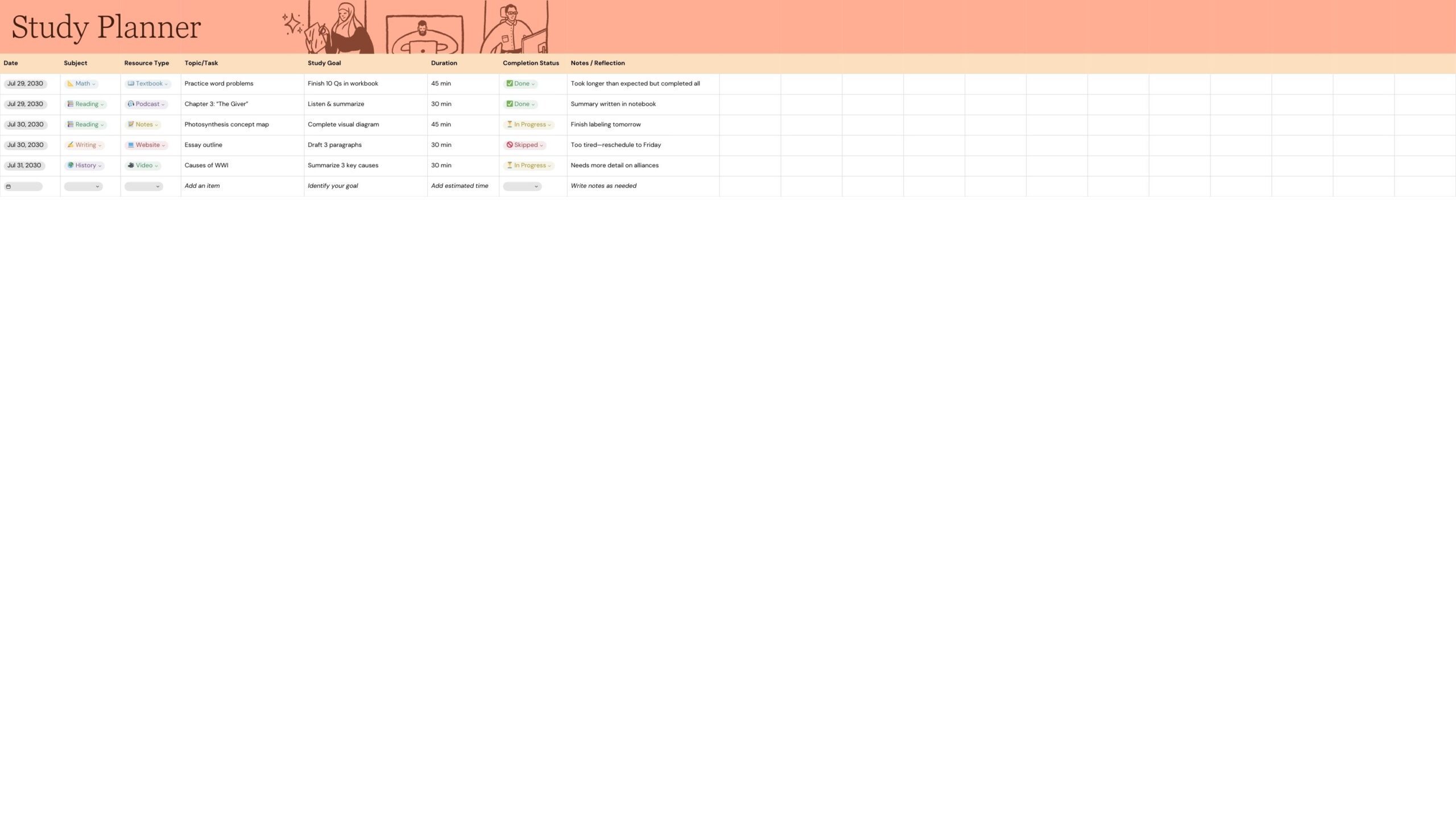
If you like spreadsheets, you can build your planner in Google Sheets or Notion and use AI plugins to automate reminders, track progress, and suggest adjustments.
Step 3: Input Your Schedule and Constraints
Once you’ve picked your tool, feed it the details:
- Your current weekly schedule (classes, work, sports, etc.)
- All upcoming deadlines and test dates
- Your preferred study times (morning, afternoon, or night)
- How long you want each study session to be
The AI uses this information to build a schedule that fits around your life — not the other way around.
Step 4: Let the AI Build Your Study Schedule
Now here’s the fun part. Once your information is in, the AI generates your study plan. It’ll typically:
- Spread study sessions evenly across available days
- Prioritize subjects with closer deadlines
- Include short breaks to keep your brain fresh (like using the Pomodoro technique)
- Avoid overloading you on any single day
Review what it creates. Does it feel realistic? Are there any conflicts you notice? Most tools let you tweak the output or ask the AI to revise it.
Step 5: Add Checkpoints and Progress Tracking
A good AI study planner doesn’t just plan — it tracks. Make sure your planner includes:
- Daily or weekly check-ins to mark sessions as complete
- A way to flag topics you’re struggling with
- Progress updates so you can see how far you’ve come
Tools like Notion AI let you add checkboxes and progress bars directly into your study plan. If you’re using ChatGPT, ask it to create a tracking table you can copy into a doc.
Step 6: Review and Adjust Weekly
Your plan isn’t set in stone. Life changes, and your planner should too. Every week, take 5-10 minutes to:
- Check which sessions you completed
- Update your deadlines or add new assignments
- Ask the AI to revise the upcoming week based on your progress
This weekly review habit is actually one of the most powerful things you can do. It keeps your plan relevant and keeps you in control.
Best AI Tools to Build Your Study Planner
Here’s a quick look at the top tools students are using right now:
1. Motion — Automatically schedules tasks based on your priorities and deadlines. It’s excellent for students with packed calendars.
2. Notion AI — Combines note-taking and planning in one place, with AI assistance for organizing and summarizing content.
3. ChatGPT / Claude — Perfect for generating custom study plans based on your specific situation. Free and highly flexible.
4. MyStudyLife — A straightforward planner designed specifically for students, with smart reminders and class scheduling.
5. Todoist with AI — Great for task management with AI-powered suggestions to help prioritize your study list.
Tips to Get the Most Out of Your AI Study Planner
Even the best planner won’t help if you’re not using it right. Here are a few habits that make a real difference:
- Be honest with your available time — don’t over-commit
- Include buffer time between sessions (breaks are not wasted time)
- Use active recall and spaced repetition in your sessions, not just passive reading
- Keep your planner updated — a plan that’s out of date is just noise
- Don’t aim for perfection; aim for consistency
One student trick that works really well: at the end of each study session, rate your confidence on the topic from 1–5. Feed this back to the AI and ask it to schedule more time on the topics where you scored low. That’s personalized learning in action.
ChatGPT is especially powerful for studying when you know how to use it right. Here’s our guide on how to use ChatGPT for studying if you want to get more out of it.
Common Questions About AI Study Planners
Is an AI study planner free?
Many tools offer free versions that are more than enough for basic planning. ChatGPT’s free tier, MyStudyLife, and Google Calendar with AI extensions are all zero-cost options. Paid tools like Motion or Notion AI offer more features but aren’t necessary to get started.
A good study plan works even better when your notes are organized. Check out our guide on AI note taking to keep everything in one place.
Can AI really replace a real tutor?
Not quite — but it doesn’t have to. An AI study planner handles scheduling and organization, while a tutor helps with understanding. They complement each other really well. Think of the AI as your logistics manager and the tutor as your coach.
What if I miss a study session?
That’s totally normal. A good AI planner will automatically reschedule missed sessions when you update it. Just tell the tool what you didn’t complete, and it’ll adjust the rest of your week accordingly. No guilt, just recalibration.
Is an AI study planner good for all ages?
Absolutely. Whether you’re in middle school, high school, college, or studying for a professional certification, an AI study planner can be customized to fit your level and goals.
Final Thoughts: Start Small, Stay Consistent
Building an AI study planner doesn’t have to be complicated. Start with what you have — even a free chatbot and a simple document — and build from there.
The real magic isn’t in the technology. It’s in the habit of planning intentionally, checking in regularly, and adjusting as you go. The AI just makes that process faster and smarter. We’ve reviewed a bunch of these in detail — here’s our complete list of AI tools for students if you want to compare before picking one.
So pick one tool, enter your goals and schedule, and let the AI do the heavy lifting. You might be surprised at how much less stressful studying feels when you actually have a solid plan to follow.
Once your sessions are scheduled, AI can help you power through assignments too. See how in our AI homework helper guide.
Ready to get started? Try asking ChatGPT or Claude right now: “Build me a 2-week study plan for [your subject] with [X hours per day available.” You’ll have a plan in under 60 seconds.
This article is part of our Student Success series on smarter learning strategies.